


Why Your Shopify Images Might Be Costing You Sales (And How to Fix It)
Ever stared at a broken image icon on a webpage and felt that twinge of frustration? Now imagine that frustration multiplied for someone using a screen reader who has no idea what that image was supposed to show. Or picture Google’s crawlers skipping right past your product photos because they can’t “see” them. That’s the reality when you neglect alt text on your online store.
What if I told you a few seconds spent on each image could boost your SEO, make your store accessible to everyone, and increase your conversion rates? It’s not magic—it’s the power of well-crafted image alt text.
In this guide, you’ll discover:
- Why Google and other search engines need your alt text to rank your images
- How to write alt text that helps both algorithms and humans
- Specific Shopify strategies that turn better alt text into more sales
- Common mistakes that might be sabotaging your efforts right now
Ready to transform those overlooked image descriptions into powerful conversion tools? Let’s dive in!
SEO Benefits of Image Alt Text
Think of alt text as the secret decoder ring that translates your beautiful product images into a language search engines can understand. Without it, you’re essentially invisible in a huge chunk of potential search results.
How Alt Text Impacts Search Rankings
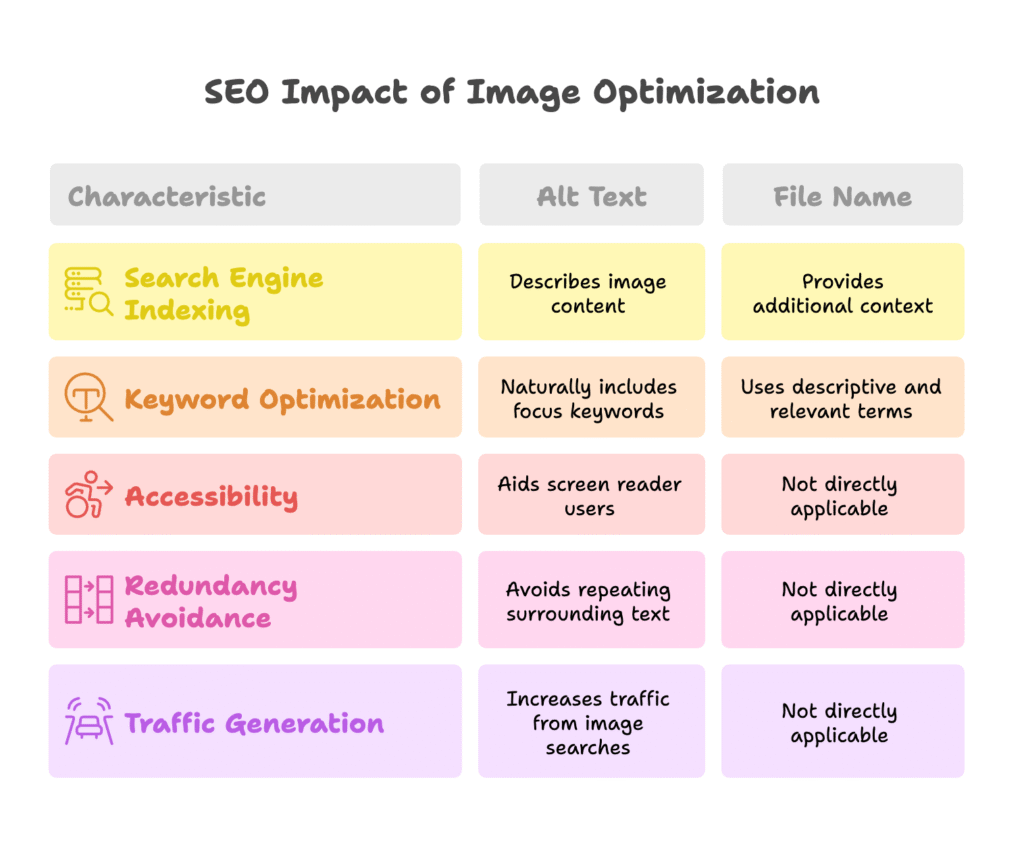
Search engines can’t “see” images the way humans do. When Google’s crawlers encounter an image on your site, they rely on the alt text to understand what they’re looking at. This text-based description is your opportunity to tell search engines exactly what your image shows, helping them index it properly.
But here’s where it gets exciting: Google Images isn’t just a separate search feature—it’s a significant traffic driver. Studies show that 20-60% of website visits can come directly from image searches. That’s potentially thousands of customers you’re missing if your product images lack proper alt text.
A jewelry store that added descriptive alt text to their product images saw a 23% increase in traffic from image searches within just two months. Would you like to see similar results for your Shopify store?
Keyword Optimization Best Practices
While keywords are essential in alt text, there’s a fine line between optimization and stuffing. Here’s how to get it right:
- Include focus keywords naturally: If you’re selling a “vintage leather crossbody bag,” that phrase belongs in your alt text—but only if it accurately describes the image.
- Use semantic keywords for context: Include related terms that help create a complete picture. For that bag, you might mention “brass buckle” or “distressed brown leather” if those features are visible.
- Keep it concise: Stay under 125 characters. Screen readers often cut off text that’s too long, and search engines prefer brevity.
Remember, the goal is to describe the image accurately while naturally incorporating relevant keywords. Think about what someone might search to find your product.
Technical SEO Considerations
File names matter too! Before uploading images to your Shopify store, rename them from generic “IMG_1234.jpg” to descriptive “blue-denim-jacket-front.jpg” to give search engines even more context.
Also, avoid redundancy with surrounding text. If your product description already mentions “blue denim jacket with pearl buttons,” your alt text doesn’t need to repeat this exact phrase. Instead, you might focus on the specific angle shown: “Front view of blue denim jacket showing pearl button detail.”
We’ve covered the SEO side of alt text, but what about the millions of potential customers who rely on screen readers? Let’s explore how accessibility and SEO work hand-in-hand to boost your store’s performance.
Alt Text for Accessibility
While SEO might drive your business goals, accessibility is about people—real customers who want to shop your products but might need alternative ways to “see” your images. When these two priorities align, everyone wins.
Screen Reader Compatibility
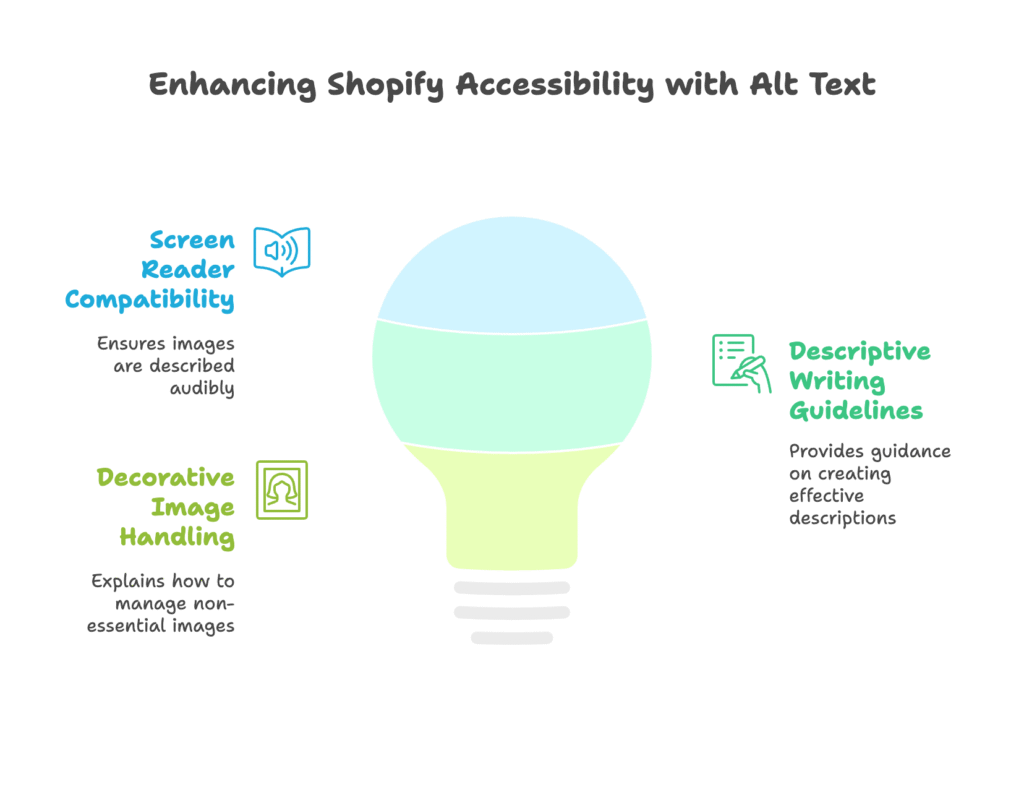
Screen readers are assistive technologies that convert digital text into synthesized speech. When a user with visual impairments visits your Shopify store, their screen reader announces each element on the page—including images.
Without alt text, screen readers will either skip the image entirely or read out the file name. Imagine hearing “IMG underscore four five seven dot jpeg” instead of “Red leather wallet with multiple card slots”—which gives you a better understanding of the product?
Testing your alt text with screen reader tools like JAWS or NVDA can be eye-opening. Many developers are surprised to hear how their carefully designed stores sound to users who rely on these tools.
Descriptive Writing Guidelines
Writing effective alt text is part science, part art. Here’s how to craft descriptions that truly help users with visual impairments:
- Be specific and concise: “A gray tabby cat napping on a windowsill” paints a clear picture, while “cat” is too vague.
- Focus on what matters in context: For a product image, describe the key features a customer would want to know.
- Avoid subjective language: Terms like “stunning” or “beautiful” don’t help someone understand what the image actually shows.
Consider this example for a wedding dress:
Poor alt text: “Dress”
Better alt text: “Wedding dress”
Best alt text: “Off-shoulder lace wedding dress with sweetheart neckline and cathedral train”
Decorative Image Handling
Not every image needs a detailed description. Purely decorative elements like background textures or divider lines can use empty alt text (alt=””) to tell screen readers to skip them.
How do you know if an image is decorative? Ask yourself: “If this image were removed, would the page lose any important information?” If the answer is no, empty alt text is appropriate.
Now that we’ve covered both SEO and accessibility benefits, let’s get specific about how proper alt text drives conversions in your Shopify store. Are you ready to turn better descriptions into actual sales?
Alt Text for Shopify Conversions
When SEO meets accessibility, the result is better user experience—and better user experience means more sales. Let’s explore how alt text directly impacts your Shopify store’s conversion rates.
Enhancing User Experience
We’ve all experienced slow-loading images while shopping online. When images take too long to appear, alt text serves as helpful fallback content, letting customers know what they’re waiting to see.
This prevents frustration and reduces bounce rates—especially on mobile connections where images might load more slowly. Even a small reduction in bounce rate can significantly impact your bottom line.
One Shopify clothing store found that adding detailed alt text reduced their mobile bounce rate by 17%, simply because customers could still understand what products they were looking at even before all images fully loaded.
Driving Image-Based Sales
Voice search is growing rapidly, with more customers using Siri, Alexa, and Google Assistant to shop online. These voice assistants rely heavily on alt text to understand and suggest products.
When someone asks their device to “find a red velvet cake stand,” stores with clear, descriptive alt text on their cake stand images are more likely to appear in results.
A baking supply Shopify store implemented detailed alt text for all product images, focusing on specific colors, materials, and uses. Within three months, they noticed a 28% increase in voice search traffic and a corresponding 13% lift in conversions from those visitors.
Technical Implementation in Shopify
Adding alt text in Shopify is straightforward—once you know where to look. Here’s how to do it:
- Go to your Shopify admin panel and navigate to “Products”
- Select the product you want to edit
- Scroll down to the “Media” section
- Click on an image to open the image details
- Add your alt text in the “Alt text” field
- Click “Save”
For stores with many products, manual updates can be time-consuming. Consider apps like SEO Image Optimizer that allow bulk editing of alt text across your entire store.
Now that you know how to implement alt text in Shopify, let’s look at some common mistakes to avoid that could undermine all your hard work.
Common Mistakes to Avoid
Even with the best intentions, these frequent errors can reduce the effectiveness of your alt text efforts. Let’s make sure you’re not falling into these traps.
Redundant Phrasing
Starting alt text with “image of” or “picture of” is unnecessary—screen readers already announce that it’s an image. It also wastes valuable character space that could be used for more descriptive content.
Avoid: “Image of a blue t-shirt”
Better: “Blue cotton t-shirt with crew neck and short sleeves”
Keyword Stuffing Penalties
Cramming multiple keywords into alt text can trigger search engine penalties. Google’s algorithms are sophisticated enough to recognize unnatural text patterns.
Avoid: “Blue t-shirt blue tee shirt men’s blue top cotton t-shirt blue clothing”
Better: “Men’s blue cotton t-shirt with white logo detail”
Overlooking Complex Images
Infographics, charts, and diagrams present a special challenge for alt text. These images often contain substantial information that can’t be conveyed in 125 characters.
For these complex images, use alt text to provide a brief overview, then include a longer description in the surrounding text or in the image caption.
Example alt text for a sales chart: “Bar chart showing monthly sales growth from January to December 2024”
Then in your caption or nearby text, you can elaborate on the specific data points and trends shown in the chart.
With these mistakes fresh in your mind, let’s explore some tools that can help you create better alt text more efficiently.
Tools & Resources
You don’t have to tackle alt text optimization alone. These tools can streamline the process and help you create more effective descriptions.
SEO Analysis Tools
Yoast SEO Image Analyzer examines your images and provides recommendations for improving both the file names and alt text. While primarily designed for WordPress, its guidelines are applicable to any platform, including Shopify.
Shopify’s built-in SEO audit tool can identify missing alt text across your store, helping you prioritize which images to optimize first.
Accessibility Testing
Accessible Alt Text Tester (AATT) allows you to check how your alt text performs with various screen readers. This insight can help you refine your descriptions for better accessibility.
WAVE (Web Accessibility Evaluation Tool) is a free browser extension that highlights missing alt text and other accessibility issues directly on your store pages.
Shopify-Specific Apps
Several Shopify apps can help automate alt text creation and management:
- TinyIMG SEO Image Optimizer: Compresses images while allowing bulk alt text editing
- Bulk Image Edit: Lets you update alt text for multiple images simultaneously
- SEO Manager: Provides recommendations for alt text as part of broader SEO optimization
With these tools in your arsenal, optimizing alt text becomes a manageable part of your regular store maintenance—not an overwhelming project.
Conclusion
We’ve covered a lot of ground in this guide to image alt text. From SEO benefits that drive traffic to accessibility features that open your store to everyone, alt text plays a critical role in your Shopify store’s success.
Let’s recap the key takeaways:
- Alt text helps search engines understand and index your images, potentially increasing traffic by 20-60%
- Properly written alt text makes your store accessible to people with visual impairments—a significant customer base you might otherwise miss
- In Shopify specifically, good alt text can reduce bounce rates, support voice search, and directly improve conversion rates
- Avoiding common mistakes like keyword stuffing and redundant phrasing makes your alt text more effective
- Several tools can help you audit and improve your alt text across your entire store
The beauty of alt text optimization is that it’s a relatively small investment of time that can yield significant returns in traffic, accessibility, and sales.
Why not start today by auditing your top 10 best-selling products? Ensure they have clear, descriptive alt text that serves both search engines and humans. Then expand to the rest of your catalog over time.
Remember: Shopify stores looking to boost conversions even further should consider tools like Growth Suite, which combines visitor behavior tracking and personalized offers to turn browsers into buyers—complementing your newly optimized product images perfectly.
References
- Image SEO: How to optimize your alt text and title text – Yoast (2021)
- How to write Image alt text for accessibility – Recite Me (2025)
- Shopify SEO Boost: Alt Text Optimization – SEOAnt (2025)
- The Complete Guide to Alt Text for SEO and Accessibility – AccessibilityChecker (2025)
- Image Alt Text: What It Is & Why It Matters – HubSpot (2024)
- How to Write Alt Text for Images for SEO – AIOSEO (2024)
- 10 Best Tips for Alt Text – Rock Content (2023)